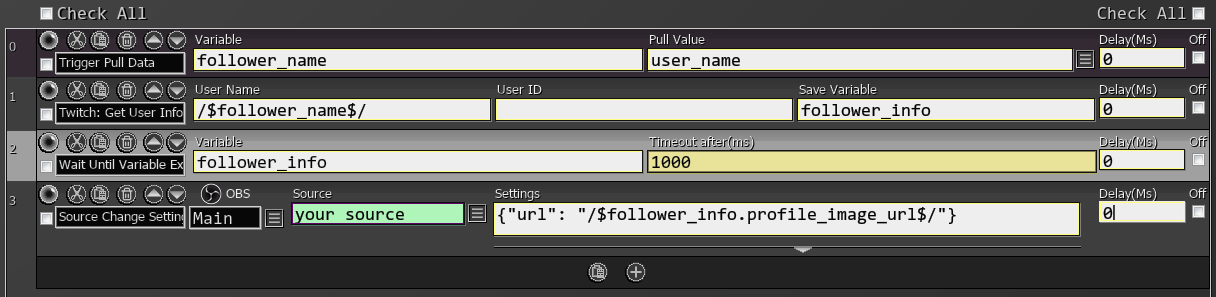
Get User Info
Retrieves information about a Twitch user. Provide either their username or user ID (leave the other one empty).
If your SAMMI crashes with an error log relating to this command, make sure you have enabled the View email address scope in your Twitch connection settings. The command will not work without this scope enabled.
This is an Async (Purple) Command, which operates differently from standard commands.
| Box Name | Type | Description |
|---|---|---|
| User Name | String | Username to get the information for |
| User ID | number | User ID to get the information for |
| Save Variable | String | Variable to save the whole object |
You can access the response object’s data by using Get Object Variable command.
Saved Payload:
| Variable Name | Type | Description |
|---|---|---|
| broadcaster_type | string | User’s broadcaster type: “partner”, “affiliate”, or “”. |
| description | string | User’s channel description. |
| display_name | string | User’s display name. |
| id | string | User’s ID. |
| login | string | User’s login name. |
| offline_image_url | string | URL of the user’s offline image. |
| profile_image_url | string | URL of the user’s profile image. |
| type | string | User’s type: “staff”, “admin”, “global_mod”, or “”. |
| view_count | number | Total number of views of the user’s channel. |
| string | User’s verified email address. Returned if the request includes the user:read:email scope. | |
| created_at | string | Date when the user was created. |
Twitch API Endpoint: GET /helix/users
Example SAMMI Response Object:
{
  "id": "98765432",
  "login": "examplestreamer",
  "display_name": "ExampleStreamer",
  "type": "",
  "broadcaster_type": "affiliate",
  "description": "Just a streamer who loves gaming!",
  "profile_image_url": "https://static-cdn.jtvnw.net/jtv_user_pictures/examplestreamer-profile_image-abc123.png",
  "offline_image_url": "https://static-cdn.jtvnw.net/jtv_user_pictures/examplestreamer-channel_offline_image-abc123.png",
  "view_count": 56789,
  "email": "user@example.com",
  "created_at": "2018-04-20T12:00:00Z"
}